
MAC Address is our key identifier to store endpoints in the endpoint database.
It is not the same case with Intune. For Intune, DeviceId is the key identifier. [Avoids problems with Randomized MAC, MACs from Docking stations, Prevents MAC spoofing].
When ClearPass Intune Extension is configured, we can enable Periodic Sync Mode.
To use ClearPass Extension as a ‘real-time’ authorization source, configure Intune as an authorization source.
Thus, when ClearPass Intune Extension is running, we have both periodic sync and Realtime authorization available to us.
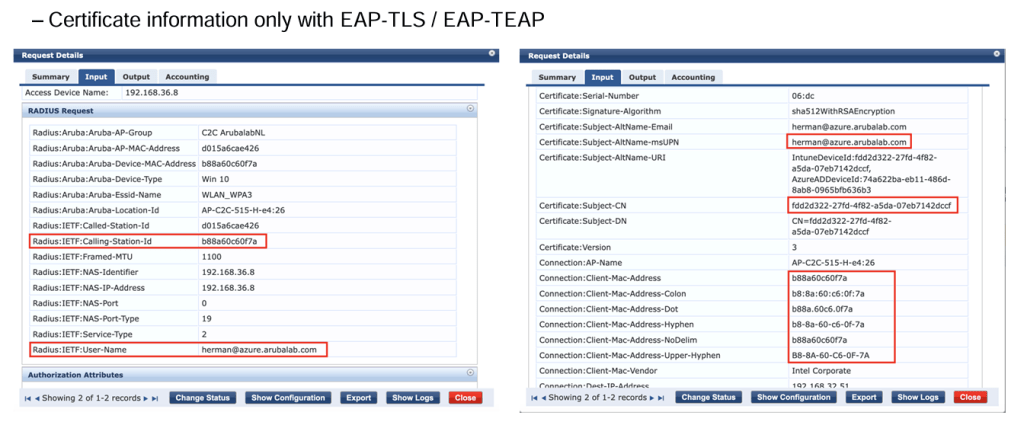
When performing EAP-TLS, the client presents the certificate, and this information comes to ClearPass.
We can get the client MAC address and the Intune DeviceId which can be a part of Subject CN or Subject Alternative Name (SAN).
Case1:
Using Periodic Sync mode, the endpoints synced from Intune are kept in endpoint database.
When we lookup the endpoint database, we usually use the mac address as the key in our filter query.
If MAC Address X is present in endpoint database, then we will look for Intune attributes locally from the endpoint database.
Case2:
According to Intune, DeviceId is the key identifier for querying the Intune database.
If MAC address X is not known in the endpoint database, we can query the Intune using the DeviceId.
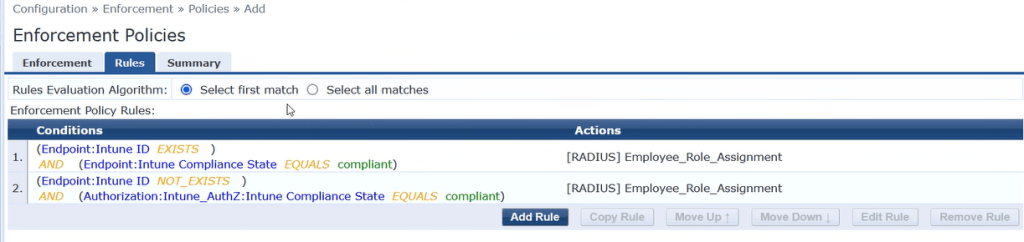
Example Policy Enforcement Profile:
If MAC address is present from periodic sync in endpoint database, do not use Realtime lookup. If MAC address is not found in endpoint database, then use Realtime lookup.
We can have the DeviceId in both the Subject CN name and Subject Alternative Name (SAN) field.
If DeviceId is in CN then, filter query in Intune authorization source is %{Certificate:Subject-CN}
If DeviceId is in SAN, then filter query in Intune authorization source is %{Certificate:Subject-AltName-URI}
SAN field will have multiple values. Backend code will take care of extracting the device ID.
ClearPass Policy Manager does the call HTTP://IP_of_the_Extension/device/info/id/<deviceID> to the ClearPass extension.
ClearPass extension has needed information(DeviceId that was passed) to make the API call to Intune.

Can we search the ClearPass endpoint database using the DeviceId ?
Yes, we can.
Need to write a filter query in endpoint repository authentication source, to lookup using the Intune DeviceId.
SQL Query using Device ID. Add this below query to the endpoint database authentication source.
select attributes->>’Intune User Principal Name’ as “Intune User Principal Name”,attributes->>’Intune Model’ as “Intune Model”,attributes->>’Intune Jail Broken’ as “Intune Jail Broken”,attributes->>’Intune Operating System’ as “Intune Operating System”,attributes->>’Intune Managed Device Owner Type’ as “Intune Managed Device Owner Type”,attributes->>’Intune Management Agent’ as “Intune Management Agent”,attributes->>’Intune Azure AD Registered’ as “Intune Azure AD Registered”,attributes->>’Intune Compliance State’ as “Intune Compliance State”,attributes->>’Intune Device Name’ as “Intune Device Name”,attributes->>’Intune Azure AD Device Id’ as “Intune Azure AD Device Id” FROM tips_endpoints WHERE attributes->>’Intune ID’ = split_part(regexp_replace(‘%{Certificate:Subject-AltName-URI}’,’^.*DeviceId:’,”),’,’,1)
 Networking & Security